Expense Tracker
Key Features & Differentiators
A smart, privacy-first expense tracking app that automatically parses bank SMS messages, learns your spending patterns, and categorizes transactions intelligently — all while keeping your data entirely on your device.
1. Smart Merchant Recognition & Learning
The Expense Tracker goes beyond simple transaction logging. It features an intelligent merchant mapping system that learns and improves over time, automatically categorizing your transactions based on past behavior.
Intelligent Merchant Mapping
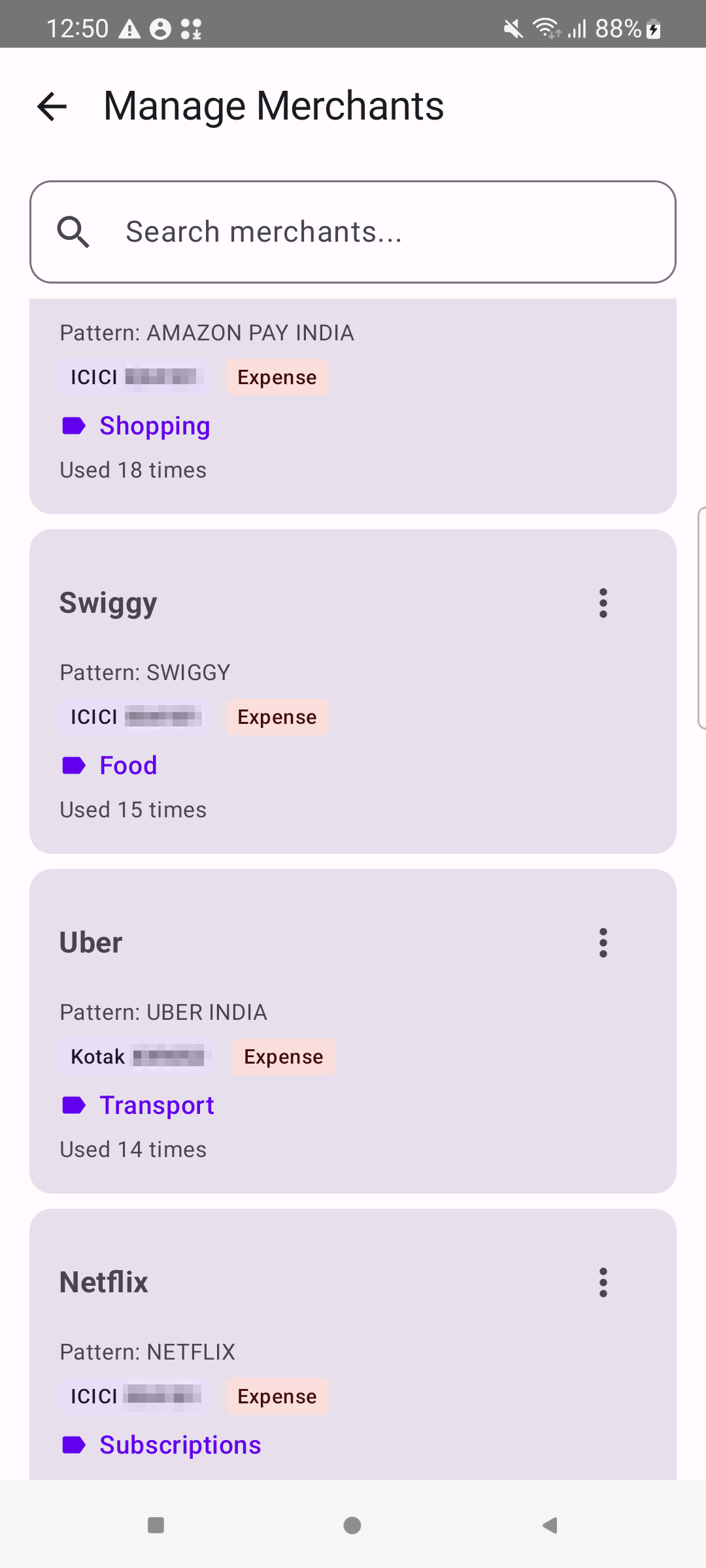
Every time a bank SMS is parsed, the app maps the raw merchant text (e.g., “AMAZON PAY INDIA”) to a clean, user-friendly name (e.g., “Amazon”) and assigns it a category (e.g., “Shopping”). This mapping is stored and automatically applied to all future transactions from the same merchant.
Usage-Count-Based Confidence
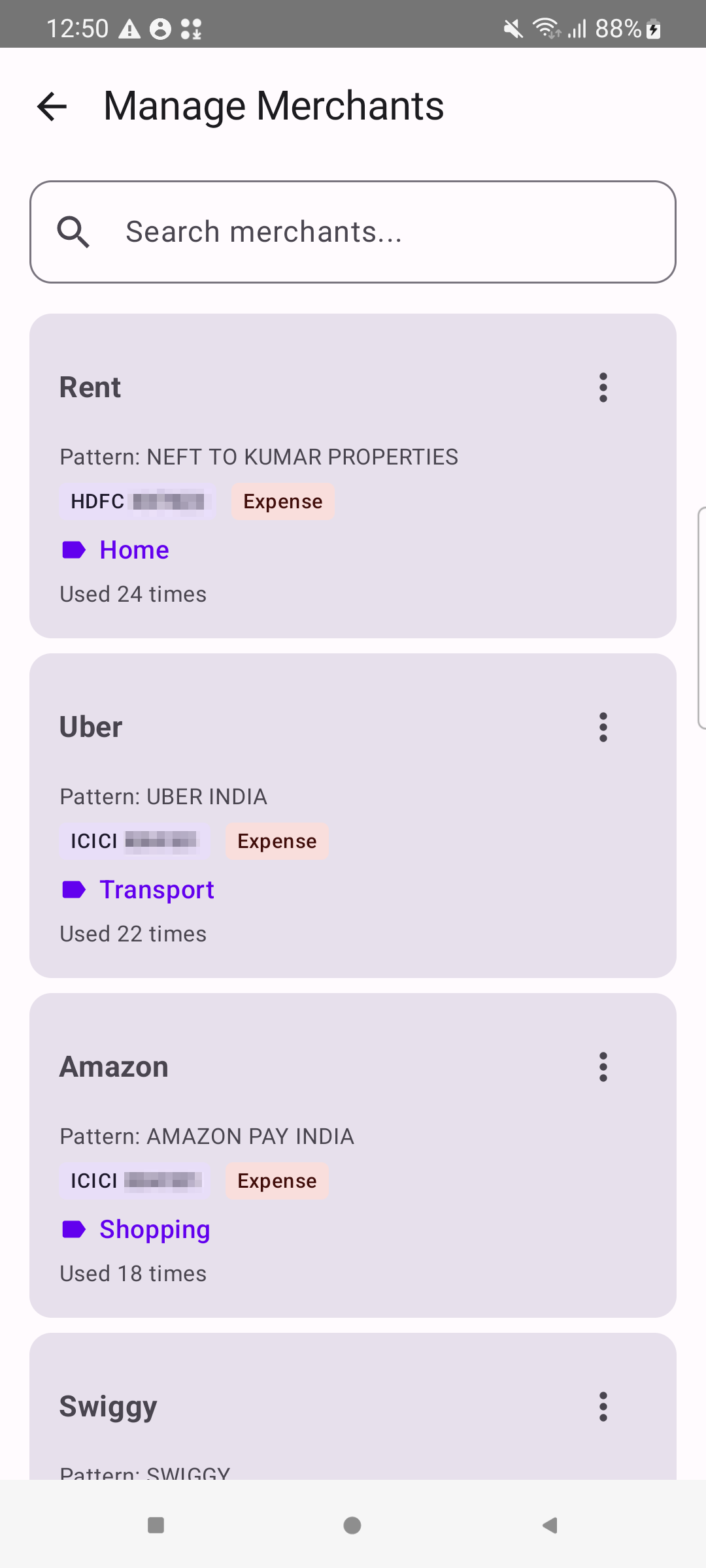
Each merchant mapping tracks how many times it has been applied. The more a mapping is used, the higher its priority — frequently used merchants are categorized instantly and with high confidence. Merchants like “Rent” (Used 24 times) and “Uber” (Used 22 times) have built up strong confidence scores through repeated use.
Per-Account Merchant Rules
Merchant rules are scoped per bank account. The same merchant (e.g., “Uber”) can have different category assignments depending on which bank account the transaction comes from. For example, Uber on ICICI might be categorized as “Transport” for personal use, while Uber on a business account could be “Business Travel.”
Merchant Merge & Consolidation
Bank SMS messages often contain inconsistent merchant names — “SWIGGY”, “SWIGGY ORDER”, and “BUNDL-SWIGGY” might all refer to the same food delivery service. The app allows you to merge merchants, consolidating messy bank SMS merchant names into a single clean name while retaining all associated patterns.
Manual Category Overrides Are Respected
When you manually change a transaction’s category, that choice is preserved. If you later update a merchant’s default category globally, all transactions are updated except those you manually changed — ensuring your intentional overrides are never lost during bulk category updates.
2. Multi-Account Support with Automatic Detection
The Expense Tracker automatically detects and creates bank accounts from SMS data. When a transaction SMS is parsed, the app extracts the bank name and last 4 digits of the account number (e.g., “ICICI XX4181”, “HDFC XX7823”) and creates a dedicated account entry. No manual account setup is required.
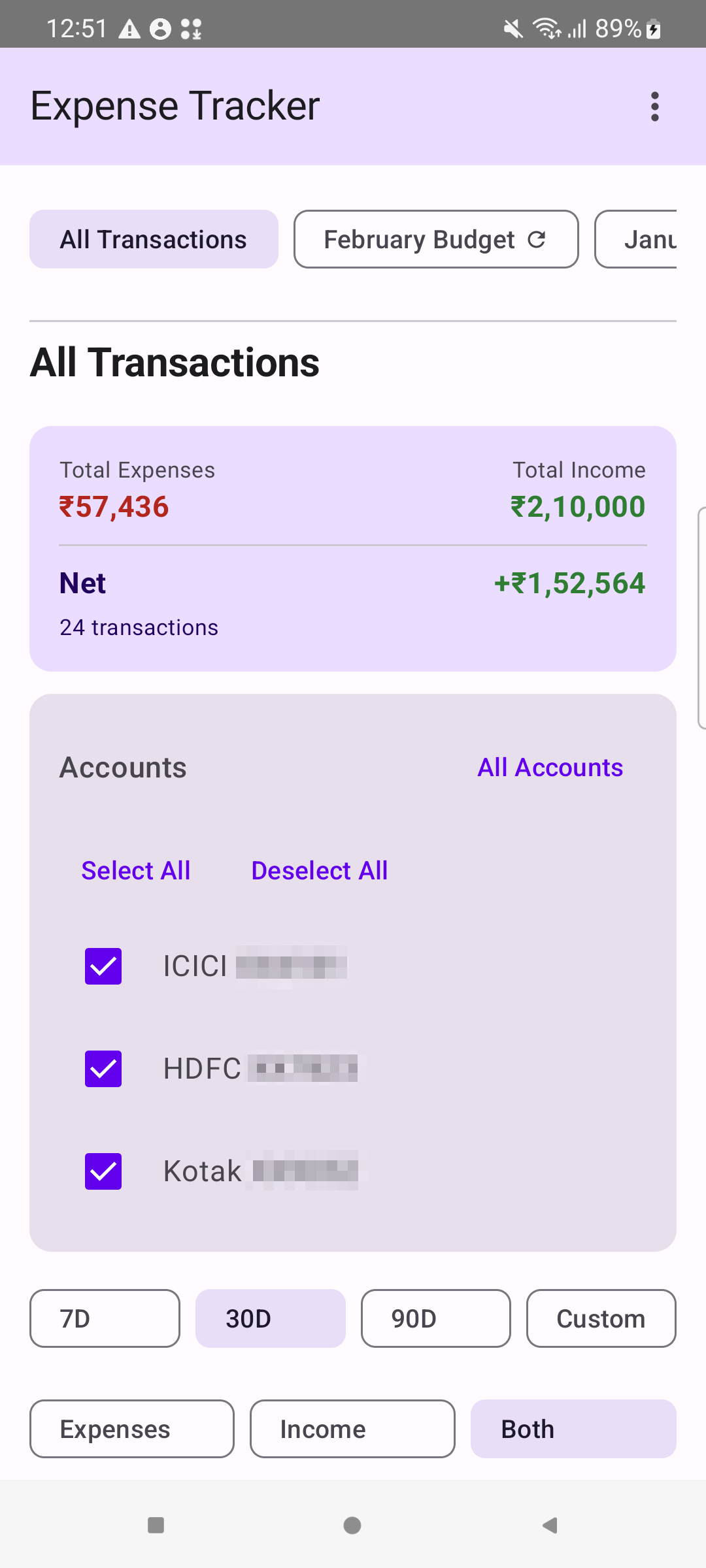
- Automatic account creation — bank accounts are created on-the-fly as SMS messages are imported
- Per-account transaction tracking — each transaction is linked to its originating bank account
- Cross-account budgets — budgets can span multiple bank accounts for a unified spending view
- Account-level filtering — quickly filter transactions by one or more specific accounts
3. Recurring Budgets with Auto-Roll
Unlike most expense trackers that require you to manually create a new budget each month, the Expense Tracker supports recurring budgets that automatically roll to the next period. Set up a budget once, and it automatically renews — monthly, annually, or on a custom schedule.
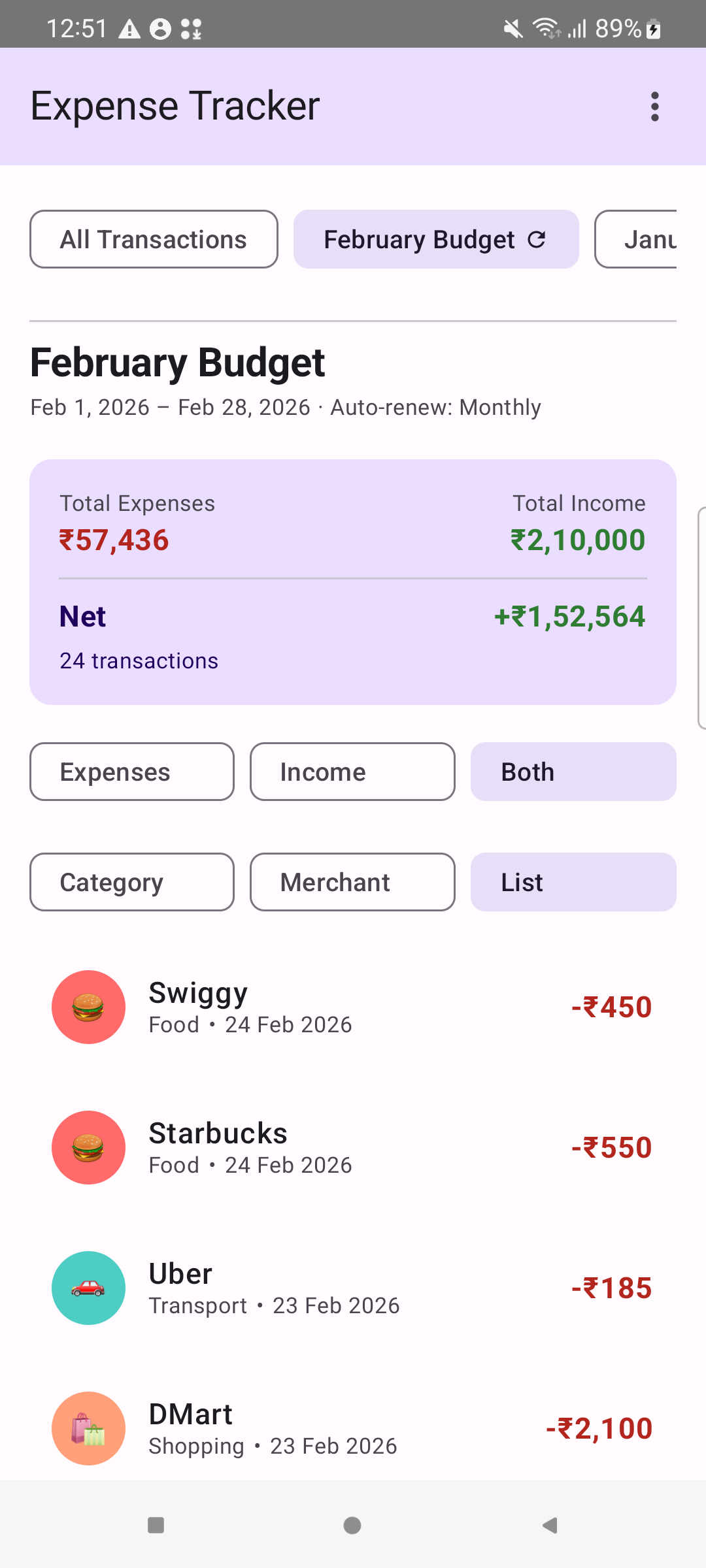
- When the app launches, it checks all recurring budgets against the current date
- If the budget period has passed, it automatically advances to the next period (e.g., February to March)
- Historical budgets are preserved so you can review previous months’ spending
- Supported recurrence types: Monthly, Annually, or one-time (no recurrence)
Once configured, the budget requires zero maintenance — making it ideal for tracking monthly spending against a fixed income or allowance.
4. Full Data Ownership
In an era where most expense tracking apps require cloud accounts and upload your financial data to remote servers, the Expense Tracker takes a fundamentally different approach: your data never leaves your device.
- Local-first storage — All data is stored in a local Room database on your Android device with no cloud sync or remote server
- Backup & restore — Export your data as a local file and import it on another device for complete data portability
- No account required — The app works immediately after installation with no sign-up, no login, and no personal information collection
- No subscription — Completely free with no premium tiers, ads, or in-app purchases
- No internet permission — The app does not require internet access, so your financial data can never be transmitted externally
5. Raw SMS Preservation
Every transaction imported from an SMS retains the complete original bank message, providing a built-in audit trail. You can tap any transaction to instantly see the exact SMS your bank sent.
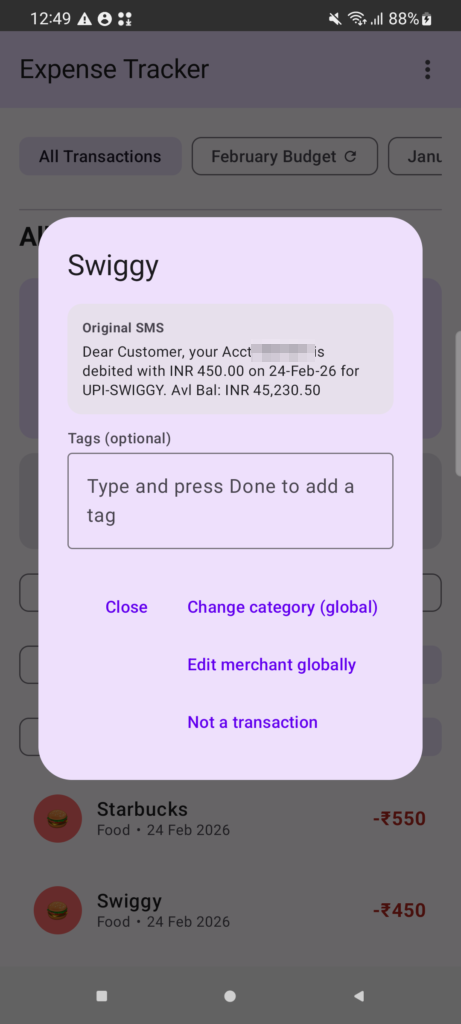
- Verification — Quickly verify any transaction against the original bank SMS without searching through your phone’s message app
- Dispute resolution — If you notice an incorrect charge, the original SMS text is right there for reference
- Parsing transparency — See exactly what the parser extracted from the SMS, building confidence in the automated import
- Data completeness — Balance information and other SMS details are preserved even if not displayed in the transaction list
6. Rich Analytics & Visualization
The app provides multiple ways to analyze your spending through interactive charts and flexible filtering options.
Category Breakdown
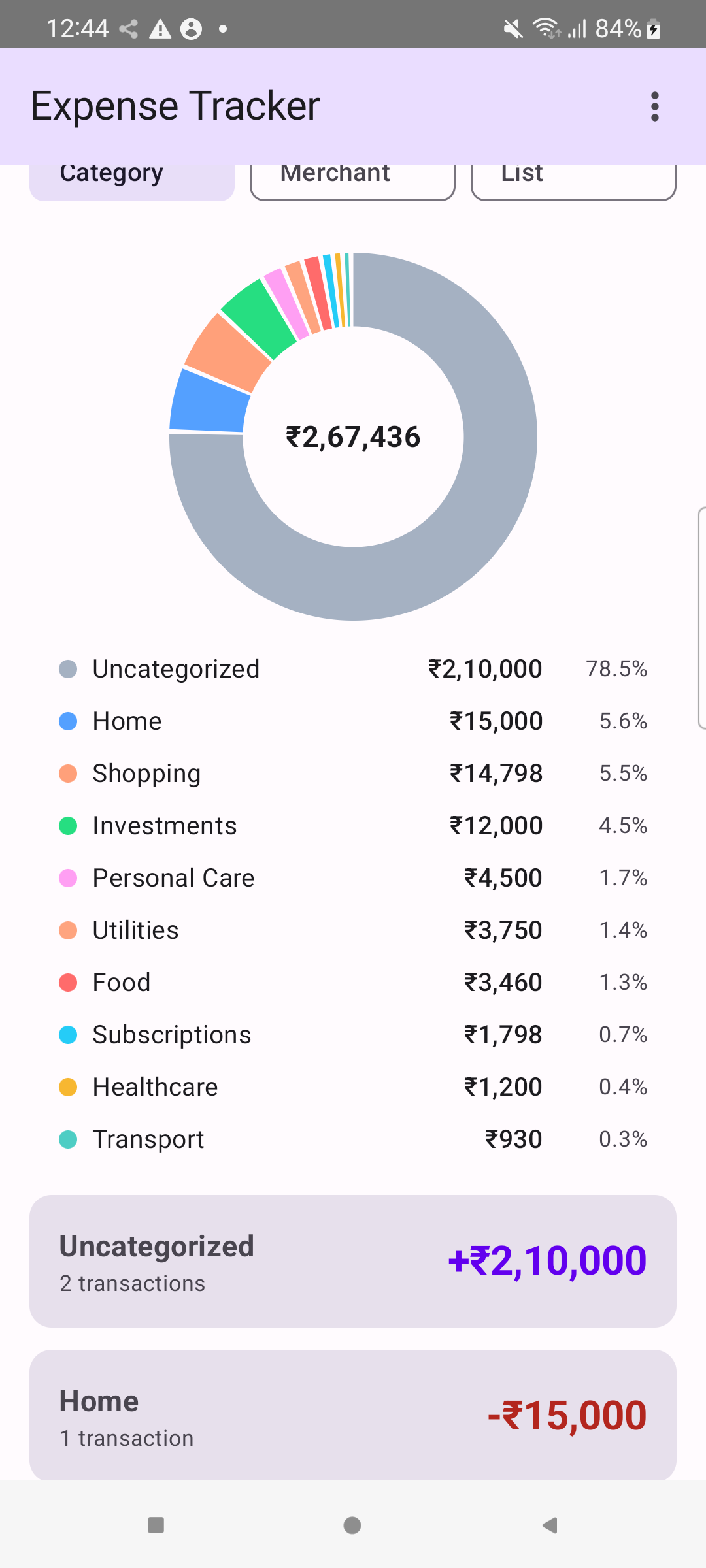
A donut chart provides an at-a-glance view of spending by category, with percentage breakdowns. Categories tracked include Home, Shopping, Investments, Personal Care, Utilities, Food, Subscriptions, Healthcare, and Transport.
Merchant Analysis
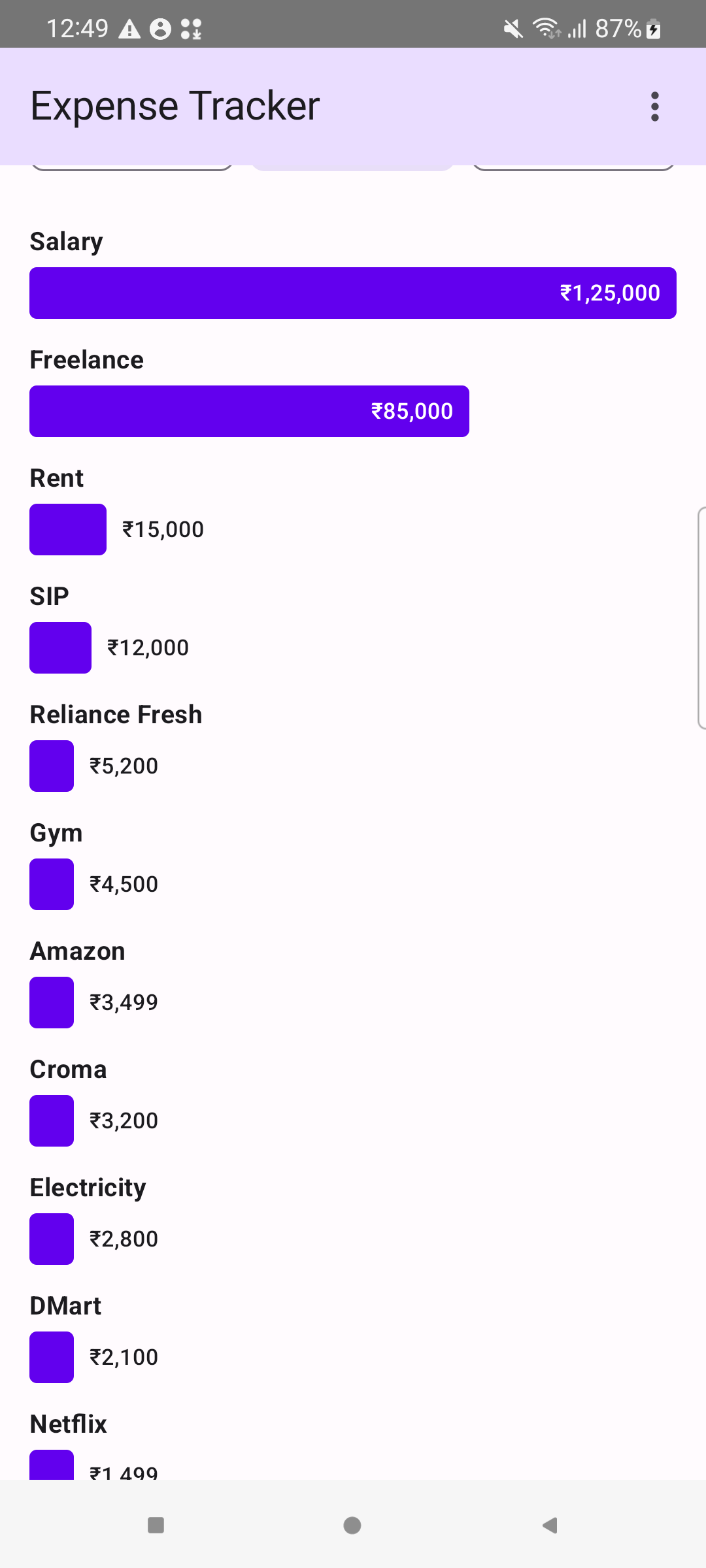
The merchant view shows spending per merchant with horizontal bar charts sorted by amount, instantly revealing your top spending destinations — from Salary and Freelance income down to individual expenses like Rent, SIP investments, Reliance Fresh, Gym, Amazon, and more.
What Sets This Apart
The biggest differentiator is the SMS parsing + merchant learning loop. Most Indian expense trackers either require tedious manual entry or provide basic SMS parsing that dumps transactions into generic, uncategorized buckets. The Expense Tracker combines smart automation with full privacy.
| Feature | Typical Expense Trackers | Expense Tracker |
|---|---|---|
| SMS Import | Basic or none | Smart parsing with merchant learning |
| Categorization | Manual | Automatic with usage-based confidence |
| Multi-Account | Manual setup | Auto-detected from SMS |
| Data Privacy | Cloud-dependent | 100% local, no internet required |
| Budget Recurrence | Manual monthly reset | Auto-rolling budgets |
| SMS Audit Trail | Not preserved | Full original SMS stored |
The Expense Tracker is designed for Indian users who want a zero-effort, privacy-first expense tracking experience that gets smarter with every transaction. No cloud accounts, no subscriptions, no manual data entry — just smart, automatic financial tracking powered by the bank SMS messages already on your phone.